
Free for 3 chats per run
Bulk delete ChatGPT chats, or archive them
ChatGPT lets you delete one chat at a time, or every chat at once. There is nothing in between. TidyChat adds the in-between: tick the chats you want gone, confirm the count, and it archives or deletes them for you, using ChatGPT's own buttons.
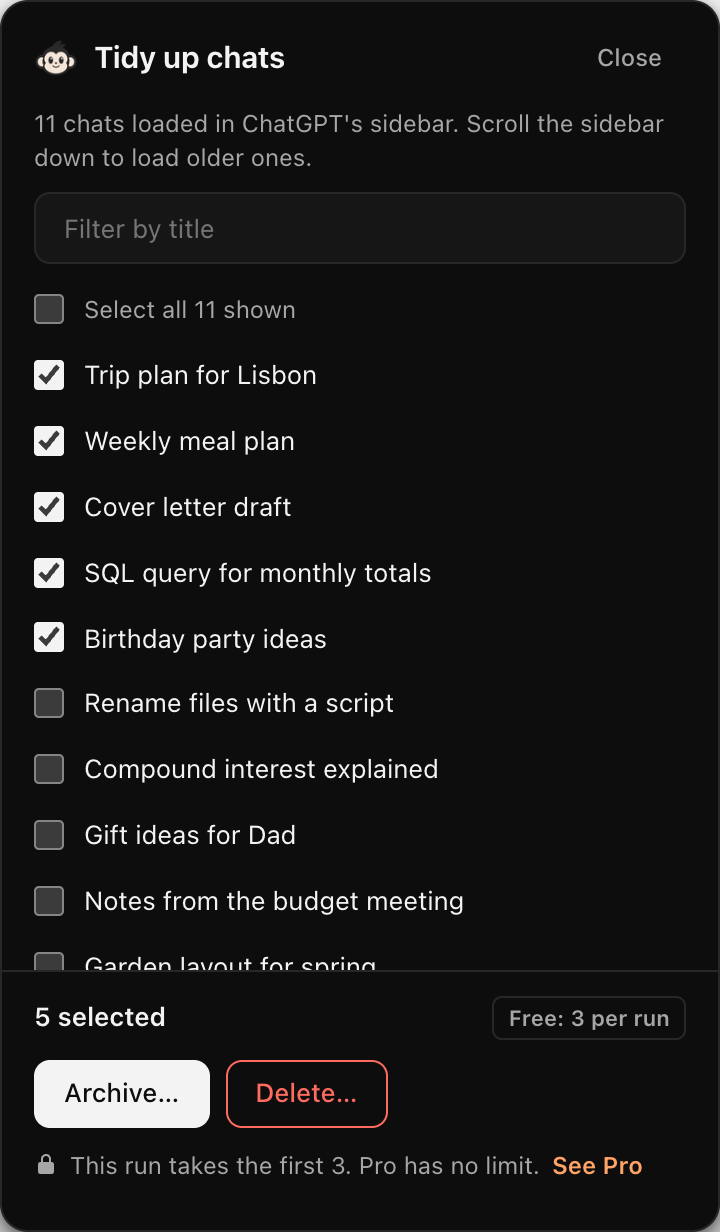
How bulk delete works
- 01
Open the panel
Click the TidyChat icon, then “Tidy up chats”. A panel opens beside ChatGPT listing the chats in your sidebar.
- 02
Pick the chats
Tick them, Shift-click to select a range, or filter by a word in the title to find every chat about one topic.
- 03
Confirm and watch it run
The confirmation shows how many chats and their titles. TidyChat then archives or deletes them one by one, with progress and a Stop button.
What you get
- Archive is the default, so nothing is lost by mistake.
- Delete is a separate, clearly marked choice that tells you it can't be undone.
- Filter by title: type “invoice” and select every chat about invoices in one go.
- Works through ChatGPT's own Archive and Delete, at the pace a person would click.
- Stops at the first thing that doesn't go as expected, and tells you what happened.
- Free for 3 chats per run. A licence removes the limit.
Archive or delete?
Archive
The chat leaves the sidebar but is kept. Find it again in ChatGPT's Settings, under Data controls, Archived chats, and restore it whenever you like. See how to find archived chats.
Delete
The chat is removed for good. ChatGPT asks for confirmation, and TidyChat asks first as well. If you might want the chat later, export it before you delete it.
Good to know
- Want every chat gone? ChatGPT's own “Delete all chats” in Settings is quicker. TidyChat is for when you want to keep some.
- TidyChat lists the chats your sidebar has loaded. Scroll the sidebar down to load older chats, and they appear in the panel.
- For now it needs ChatGPT set to English, because it finds the Archive button by its name. In another language the panel says so and switches itself off.
- Selecting chats by age isn't available yet. ChatGPT's sidebar doesn't show dates.
Questions
Does ChatGPT have a bulk delete option?
Not for some chats. ChatGPT can delete one chat at a time from its menu, or every chat at once from Settings, under Data controls. There is no way to tick several chats. We checked this on 17 November 2026.
Can I undo a bulk delete?
No. Deleted chats cannot be brought back. Archive is the default for that reason: archived chats can be restored from Settings, Data controls, Archived chats.
How many chats can I delete at once?
3 per run on the free version. If you select more, TidyChat takes the first 3, says so before it starts, and leaves the rest selected for the next run. A paid licence removes the limit.
Does it work in the ChatGPT phone app?
No. TidyChat is a Chrome extension, so it works on chatgpt.com in Chrome on a computer.
Does TidyChat see or upload my chats?
It reads the chat titles in your sidebar so you can pick from them, in your own browser. Nothing is sent to us or anyone else, and TidyChat never reads your login session.